Stop guessing what's wrong in your AWS
Automatically detect cost spikes, missing backups, and risky misconfigurations before they become problems
7-day free trial + FOREVER FREE PLAN • No credit card required • Read-only access
Cost Spike Story
Unusual spend in one account is highlighted immediately with expected vs actual trend.
Risk Narrative
Misconfigurations and missing backup coverage are surfaced in plain language, not noisy logs.
Audit Readiness
Downloadable compliance evidence helps teams prepare for reviews without manual chasing.
Everything you need to stay on top of AWS
Cost anomaly detection
Spot unusual spending patterns before they spiral out of control
Backup verification
Know what's actually protected, not just configured
Misconfiguration detection
Find security gaps before attackers do
Report generation
Audit-ready compliance evidence on demand
Question 1
What is this?
An AWS monitoring tool focused on cost, backup, security, and compliance reporting.
Question 2
Why should I care?
It catches the expensive and risky issues teams usually discover too late.
Question 3
What do I do next?
Connect AWS in read-only mode and start free monitoring in minutes.
Every AWS team hits these walls
“Backups are configured but we've never actually verified they work”
“AWS bills surprise us every month — we can't track where the money goes”
“Preparing for audits is manual, stressful, and takes weeks of evidence gathering”
“We assume things are working correctly until something fails”
“Security groups get changed during incidents and nobody tracks what happened”
Baseline Sentinel fixes this.
Continuous monitoring that catches problems early — no guesswork, no surprises.
Try It Free for 7 DaysHow It Works
Three simple steps to visibility, security, and peace of mind
Connect AWS
Create a read-only IAM role (we provide the exact policy). No agents, no infrastructure changes.
Continuous scanning
We scan your infrastructure 24/7 for cost anomalies, backup gaps, security issues, and configuration drift.
Alerts + reports
Get instant alerts via Slack, Teams, or email. Generate compliance reports in seconds, not weeks.
See it in action
Real visibility into your AWS infrastructure
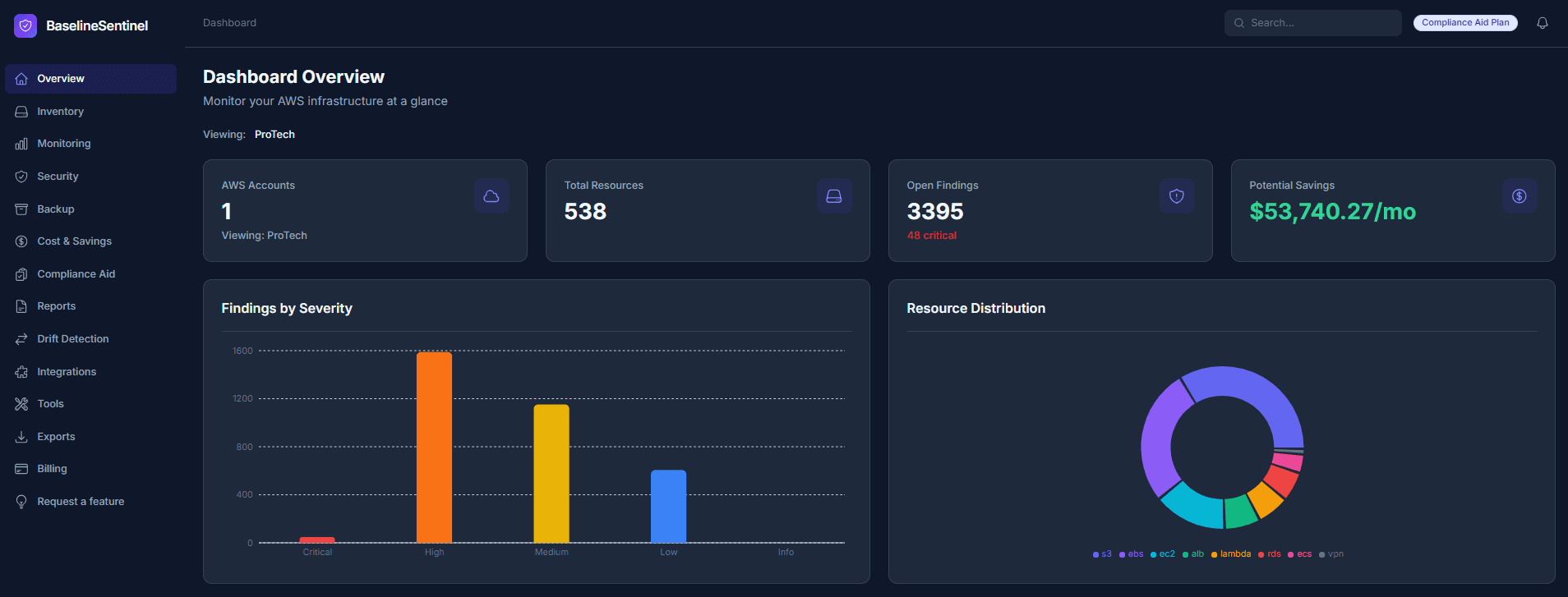
Complete AWS visibility in one dashboard
See all your EC2 instances, RDS databases, S3 buckets, security findings, cost trends, and backup coverage status — all in one place.
Backup gap detection
Instantly see which resources are unprotected. Generate AWS Backup policies automatically.
SOC 2, HIPAA, PCI-DSS, CIS
Track compliance scores across frameworks. Generate audit evidence in seconds, not weeks.
Data is gathered through read-only AWS APIs across Config, IAM, Security Hub, Backup, CloudTrail, and GuardDuty so your evidence is traceable to source systems.
Optional Modules:
- CloudTrail Archive: Detailed activity logs for investigation trails often requested by auditors.
- VPC Flow Logs: Network traffic evidence for segmentation and incident review.
- GuardDuty: Continuous threat detection findings for security controls and audit narratives.
You can also import GuardDuty findings into this view to correlate threat detections with compliance controls and remediation tracking.
15+ built-in DevOps tools
- SSL Monitor – Monitor sites for SSL certificate expiration
- Site Monitor – Track site uptime and response times
- Infrastructure Monitor – Track outages across major cloud, CDN & identity providers
- Reminder Creator – Schedule recurring infrastructure alerts to any notification channel
- Password Generator – Generate configurable, cryptographically secure passwords
- One-Time Secret – Share sensitive data via self-destructing encrypted links
- TLS Checker – Inspect TLS protocol versions supported by any hostname
- UUID Generator – Generate bulk v4 UUIDs instantly
- Base64 Encode/Decode – Encode or decode Base64 strings in one click
- IP Calculator – CIDR/subnet calculator with binary subnet view
- SSL Info – Check SSL certificate details for any domain
- Port Checker – Test if a TCP port is open on any host
- DNS Lookup – Query DNS records (A, CNAME, MX, TXT, and more) for any domain
- Ping Tool – Ping a host and measure network latency
13+ auto-generated reports
Scheduled delivery to auditors. XLSX export included.
- Inventory – Account-specific inventory with summary page and clickable tabs for EC2, ECS, ALB, RDS, S3, Lambda, and more
- Security Groups – SG rules: inbound/outbound, open ports, overly permissive access
- Publicly Exposed Resources – Resources with public IPs or open inbound rules (0.0.0.0/0)
- S3 – Bucket status: public/private, lifecycle rules, versioning, encryption
- ACM Certificates – Certificate inventory: domain, status, expiry, and in-use resources
- CloudWatch – Log group coverage: retention settings, stored bytes, metric filters
- RDS – Database inventory: engine, Multi-AZ, encryption, public access, backup retention
- EC2 – Instance details: type, state, VPC, IPs, IAM role, and security groups
- KMS Keys – Key inventory: rotation status, usage, and key state
- Backup – AWS Backup status: protected resources, last backup, recovery points
- VPC Flow Logs – Network logging: flow log status, destination, and traffic type
- IAM – Credential audit: users, roles, access key age, inactive accounts, overly broad policies
- O365 Users – Microsoft 365 users: licenses, MFA status, and last sign-in
- JumpCloud Users – JumpCloud users: groups, MFA status, and system bindings
- CloudTrail Activity – Change & activity audit: root usage, IAM changes, KMS, security group exposure, and more. Risk-rated Critical → Info. Last 14 days.
What you get
Real outcomes, not just features
Avoid surprise AWS costs
Get alerted when spending patterns change. Identify idle resources, oversized instances, and opportunities to save money before your bill arrives.
Know backup status at all times
Stop wondering if backups work. See what's protected, what's missing, and get alerts when backup jobs fail — before you need to restore.
Be audit-ready without manual work
Generate compliance reports in seconds. Schedule automatic delivery to your compliance officer or auditor. No more scrambling for evidence.
Catch issues early
Find misconfigurations, security gaps, and drift before they cause outages. Get alerts when someone makes changes that break your baselines.
Built for teams like yours
Whether you're just getting started or managing multiple accounts
Startups on AWS
Get enterprise-level monitoring and compliance without hiring a dedicated cloud team. Know what's running, what it costs, and what needs attention.
Small DevOps teams
Stop building custom monitoring tools. Focus on shipping features instead of chasing infrastructure alerts and compliance paperwork.
Compliance-focused teams
Generate SOC 2, HIPAA, PCI-DSS, and CIS evidence automatically. Schedule reports for quarterly reviews. Export to XLSX for auditors.
Engineers who hate alert noise
Get alerts only when something matters. Daily digests for routine changes. Real-time alerts for critical issues. You control the noise level.
Staffing cost vs monthly platform cost
Hiring a cloud automation engineer to build and maintain AWS monitoring/reporting automation typically starts around $100,000+ per year, plus tooling and ongoing maintenance overhead.
Build internally
- Cloud automation engineer salary: $100,000+ / year
- Time to design, build, test, and maintain dashboards
- Ongoing maintenance for drift, backups, compliance evidence
- Additional burden during audits and incident windows
Baseline Sentinel
- Lower predictable monthly pricing per AWS account
- Ready-made monitoring, backup checks, and compliance reporting
- Fast setup with read-only IAM access
- Immediate operational value without extra headcount
Need help with initial setup?
If you need assistance, we can set this up for your infrastructure for a one-time fee based on scope.
Contact Us for Setup AssistanceSimple, transparent pricing
Start with a 7-day full-feature trial (no credit card). When the trial ends without a paid subscription, your workspace automatically moves to the Free plan so you can keep using core reports and tools.
Free
After your 7-day trial, stay on Free with core AWS visibility and tools—or upgrade anytime.
Start free trial- 1 AWS account
- EC2 & ACM reports
- Network & utility tools (limits apply)
- 1 site monitor · no SSL monitors
- 1 reminder · 5 one-time secrets/day
Base
$10/additional user/month
Essential AWS monitoring and security for single account teams.
Start Free Trial- 1 AWS account
- Full AWS inventory across 20+ services
- CloudWatch monitoring baselines
- Security scanning (CIS, public S3, open SGs)
- 12-month cost analysis
- Terraform export
- Email & Slack alerts
Base+Drift+Backup
$20/additional user/month
Everything in Base plus drift detection, backup management, and advanced cost savings.
Start Free Trial- Everything in Base
- Up to 5 AWS accounts
- Drift detection (modified, added, deleted)
- AWS Backup baseline generator
- Coverage gap detection
- Advanced cost recommendations
- Teams, PagerDuty, Telegram integrations
Compliance Aid
$20/additional user/month
SOC 2, HIPAA, PCI-DSS compliance scoring with 13+ audit-ready reports.
Start Free Trial- Everything in Base+Drift+Backup
- Up to 10 AWS accounts
- Compliance frameworks (SOC 2, HIPAA, PCI-DSS, CIS)
- 13+ infrastructure reports with XLSX export
- Scheduled report delivery
- IAM credential & access review
- Jira Ops integration
Enterprise
For organizations managing 10+ AWS accounts with custom limits and dedicated support.
Contact Us- Everything in Compliance Aid
- 10+ AWS accounts
- Custom monitor & usage limits
- Deployment assistance
- Priority support
- Custom SLA
Paid plans include full inventory, security scanning, SSL monitoring, and team seats. The Free plan includes EC2 & ACM reports plus essential tools with lower limits—see the Free column above.
Need more than 10 accounts? Contact us for Enterprise pricing
Built by AWS practitioners
We've spent years managing AWS infrastructure. Baseline Sentinel is the tool we wished existed.
Never modifies your infrastructure. Zero write permissions required.
Nothing to install, patch, or maintain on your infrastructure.
IAM role setup time. Start monitoring in minutes, not days.
Know what's happening in your AWS before it becomes a problem
Join teams who stopped guessing and started monitoring
Start Free Monitoring7-day free trial • No credit card • 2-minute setup